
[vc_row][vc_column][vc_column_text]I realized last night after hooking up my new Heusinkveld Ultimate pedals that I no longer had a way to connect my Fanatec Handbrake to my PC. OOPS!
Fanatec do sell a USB Dongle, but I didn’t really want to buy something and have to wait for shipping, and I knew the HE controller had additional inputs for analog axies, so I made my own adaptor.
Here’s how I did it……
While I did this for an Heusinkveld controller, the same principals should apply for any controller that accepts analog inputs with 5V+, Ground and Signal inputs. You’ll just need to know the pinout configuration of the device you’re connecting to.
NOTE: I take no responsibility for any damage or injury as a result of following this guide. These steps may also void your warranty.
[su_youtube_advanced url=”https://www.youtube.com/watch?v=WcyIdp3-pq8″ showinfo=”no” rel=”no”]
At the time of making this video, the pinouts for the 3.5mm jack and RJ12 connector appear to be as follows, however PLEASE check for yourself before assuming this is correct:
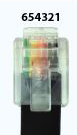
Signal | 3.5MM Jack = Sleeve | RJ12 = Pin 2
+5V | 3.5MM Jack = Ring | RJ12 = Pin 1
Ground | 3.5MM Jack = Tip | RJ12 = Pin 5 + 6
[/vc_column_text][vc_column_text]___________________________________________
JUMP IN OUR DISCORD COMMUNITY HERE:
https://discord.gg/7YzjkFQ
___________________________________________
Keen to support Boosted Media? CLICK HERE:
https://boostedmedia.net/support-boosted-media/
___________________________________________
GRAB YOUR FANATEC GEAR HERE:
US: BUY FANATEC GEAR HERE
EU: https://boostedmedia.net/go/fanatec-webstore-europe-english/
AU: https://boostedmedia.net/go/fanatec-webstore-australia/
JAPAN: https://boostedmedia.net/go/fanatec-webstore-japan-english/[/vc_column_text][/vc_column][/vc_row]
