
Completing MOZA’s Airbus Cockpit
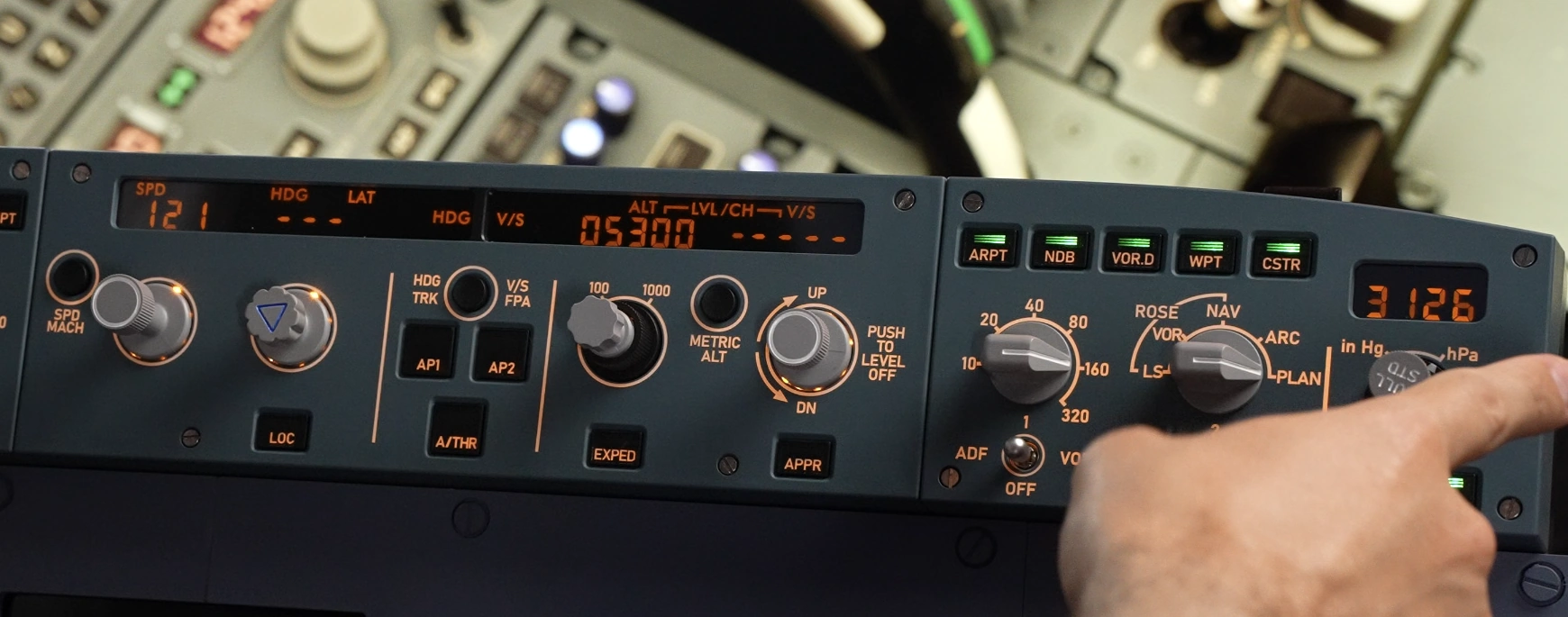
The Flight Control Unit is arguably one of the busiest areas of an Airbus cockpit. Long before the aircraft reaches cruise, you’re already interacting with it to select speeds, headings, altitudes and vertical modes. During the descent it becomes even busier, while the EFIS panels either side are constantly being used to adjust navigation displays, barometric pressure and navigation aids. It’s one of those pieces of hardware you don’t necessarily appreciate until you’ve flown with one, but once you have, reaching back to the mouse starts feeling surprisingly unnatural.
That’s exactly what makes the MOZA MA3F Electronic Flight Control Modules so interesting.
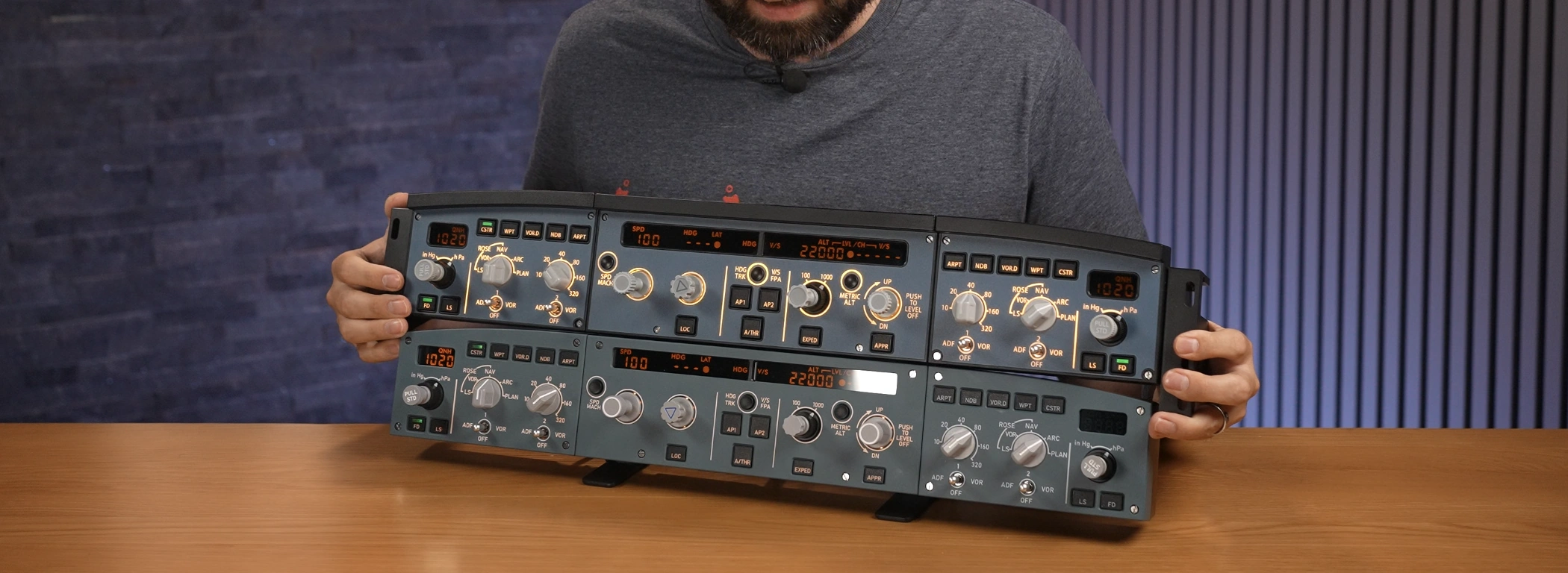
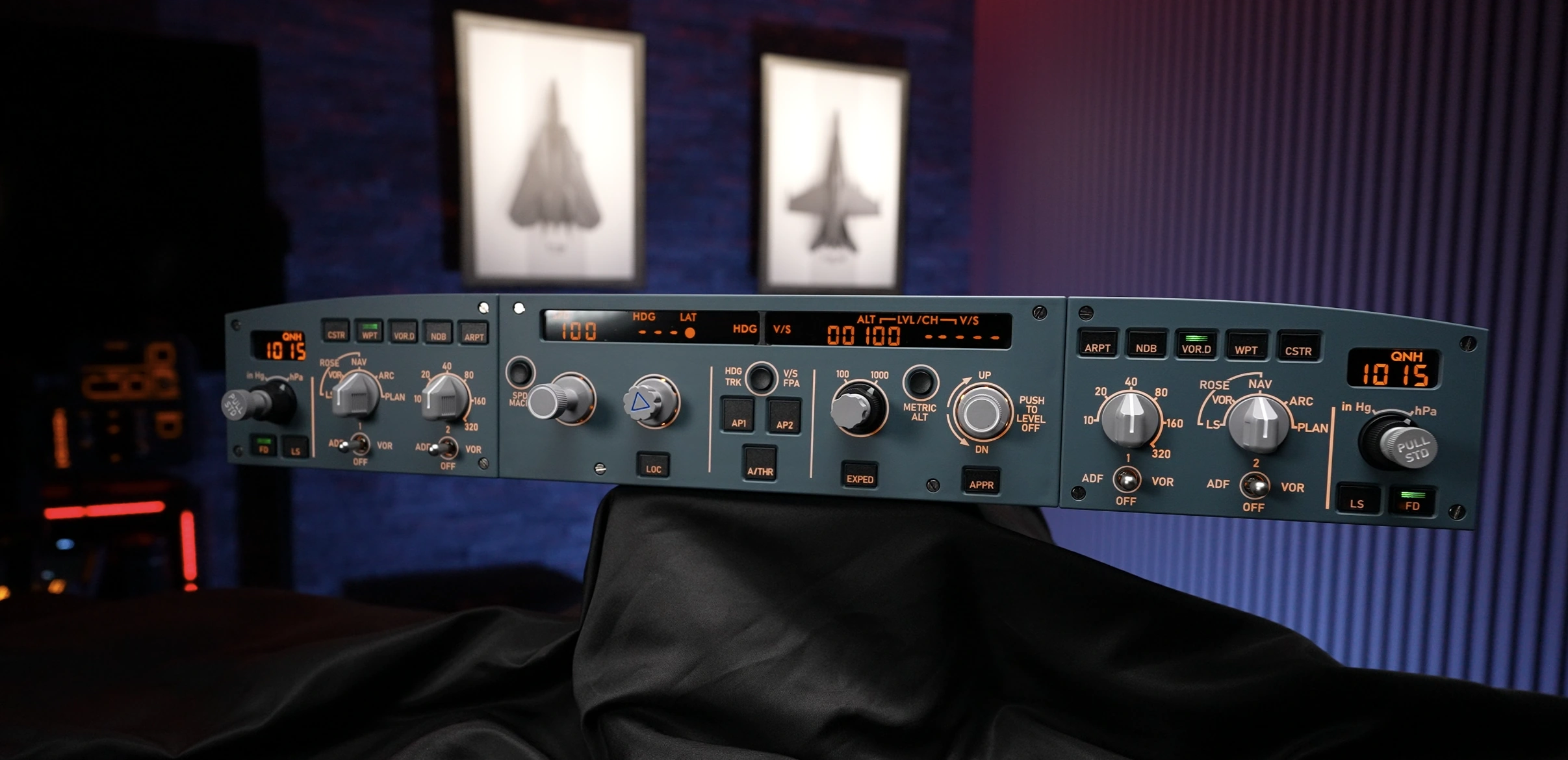
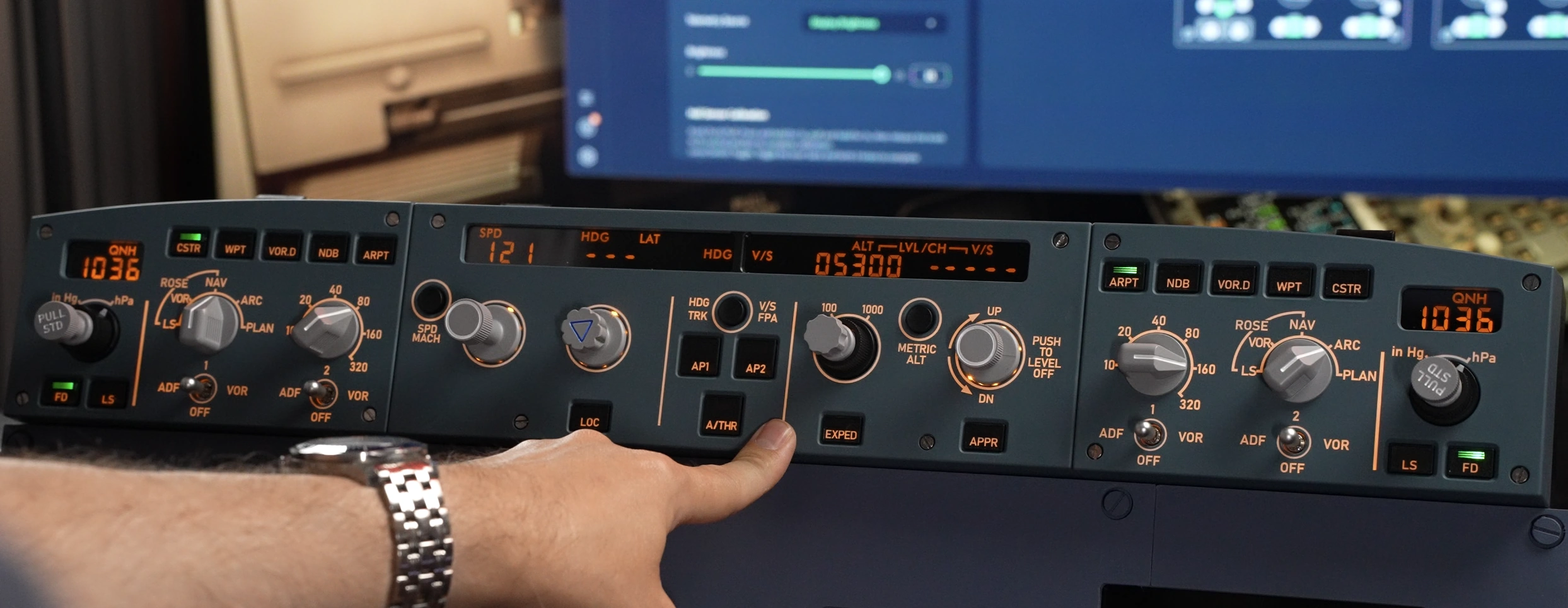
Rather than simply recreating the Airbus Flight Control Unit, MOZA has produced a complete glareshield solution consisting of the Flight Control Unit together with optional left and right EFIS panels. On paper it ticks all the boxes you’d expect from a premium Airbus replica, but MOZA has also added several simulator-focused features that go beyond the real aircraft, continuing the philosophy introduced with the MA3F Flight Computer Display.
For this review I tested the MA3F EFCM across Microsoft Flight Simulator 2020, Microsoft Flight Simulator 2024 and X‑Plane while comparing it directly against my long-term WINCTRL 3X0 Glare Shield. That comparison is particularly important because the WINCTRL hardware has been my daily driver for a long time, including countless Airbus flights and WorldFlight events. As always, every opinion below is based solely on my own testing over the past few weeks.

By purchasing through links on this page you’ll be supporting Boosted Media at no additional cost to you! This option is available for a huge range of Sim Racing gear.


Pricing
At the time of review the MA3F Flight Control Unit retails for approximately AUD $279, USD $149 or EUR €159, while each EFIS panel comes in at around AUD $189, USD $99 or EUR €109.
That brings the complete FCU and dual EFIS package to approximately AUD $657 or USD $347, placing it roughly 21% more expensive than the equivalent WINCTRL package here in Australia at recommended retail pricing.
Boosted Media readers can also save a little by using the code BOOSTED on the MOZA website.
Hardware Overview
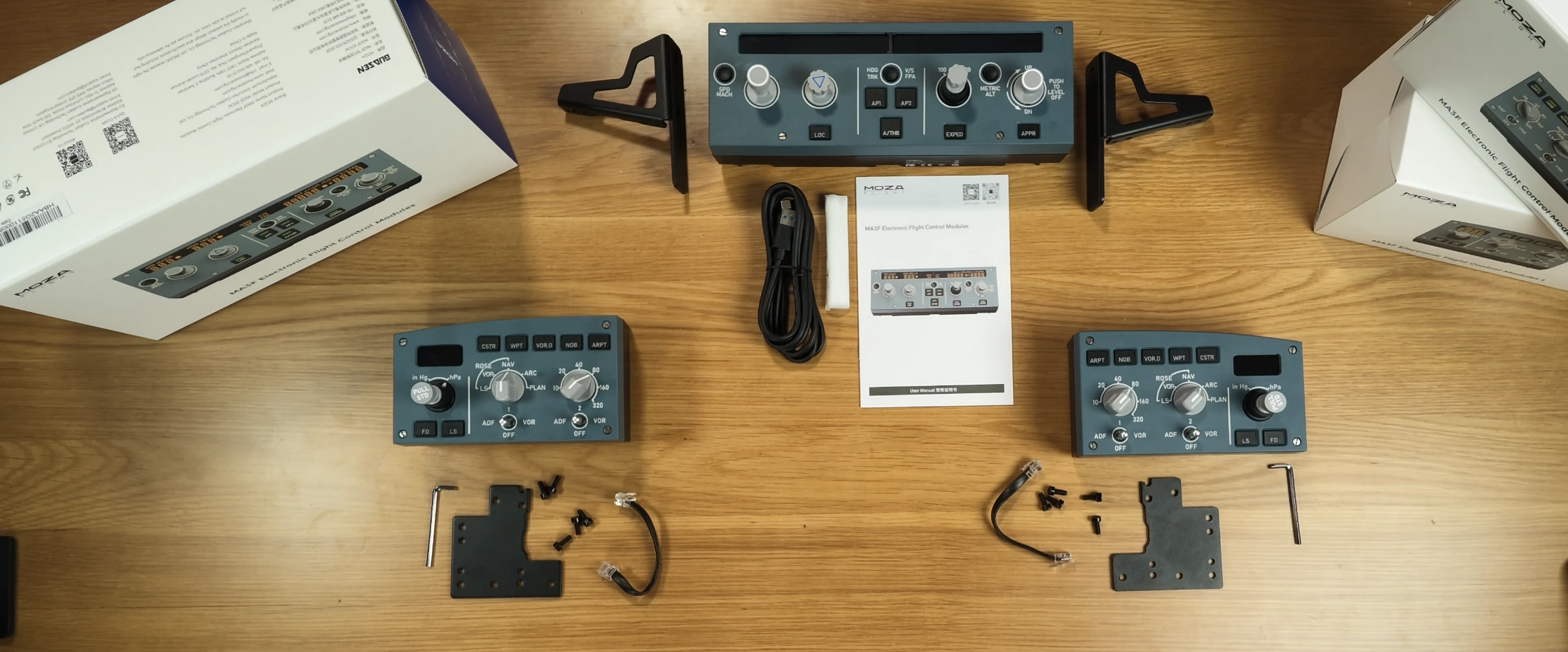
The MA3F EFCM arrives well packaged and includes the Flight Control Unit, desktop stand, USB Type‑C cable, mounting hardware, screwdriver, quick-start guide and the plastic joining brackets required to attach the optional EFIS panels into one complete assembly.
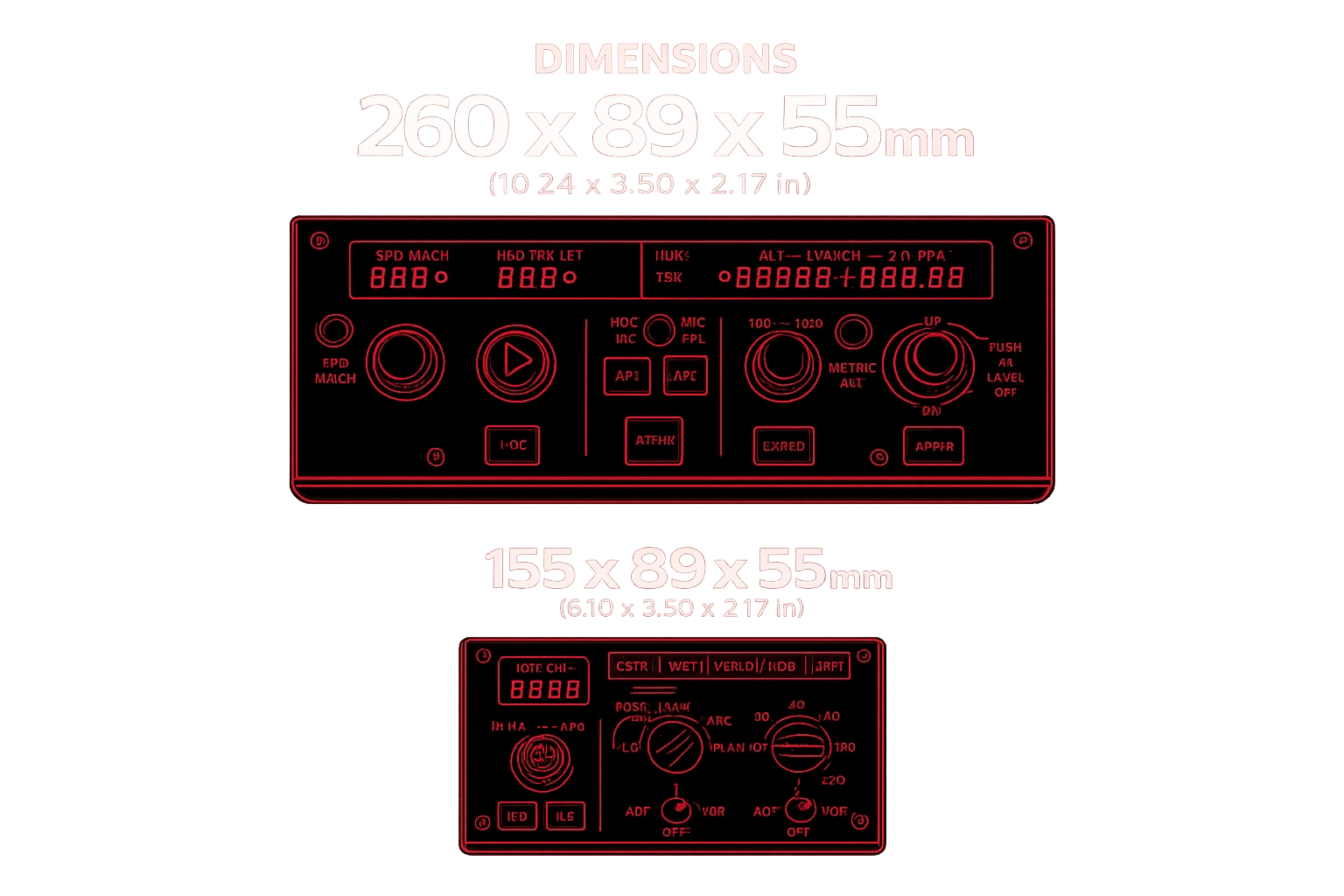
The Flight Control Unit itself measures 260 × 89 × 55 mm, while each EFIS panel measures 155 × 89 × 55 mm. Including the selector knobs, overall depth increases to approximately 81 mm, resulting in dimensions that are extremely close to the real Airbus glareshield.
Unlike the MA3F Flight Computer Display, which features a die-cast aluminium front plate, the EFCM uses an all-plastic construction. Initially I wasn’t entirely sure how I’d feel about that, particularly after reviewing the Flight Computer Display beforehand. After a few weeks of flying though, it quickly became clear that the overall experience wasn’t defined by the materials. Instead, it was the consistency of every interaction that left the stronger impression.
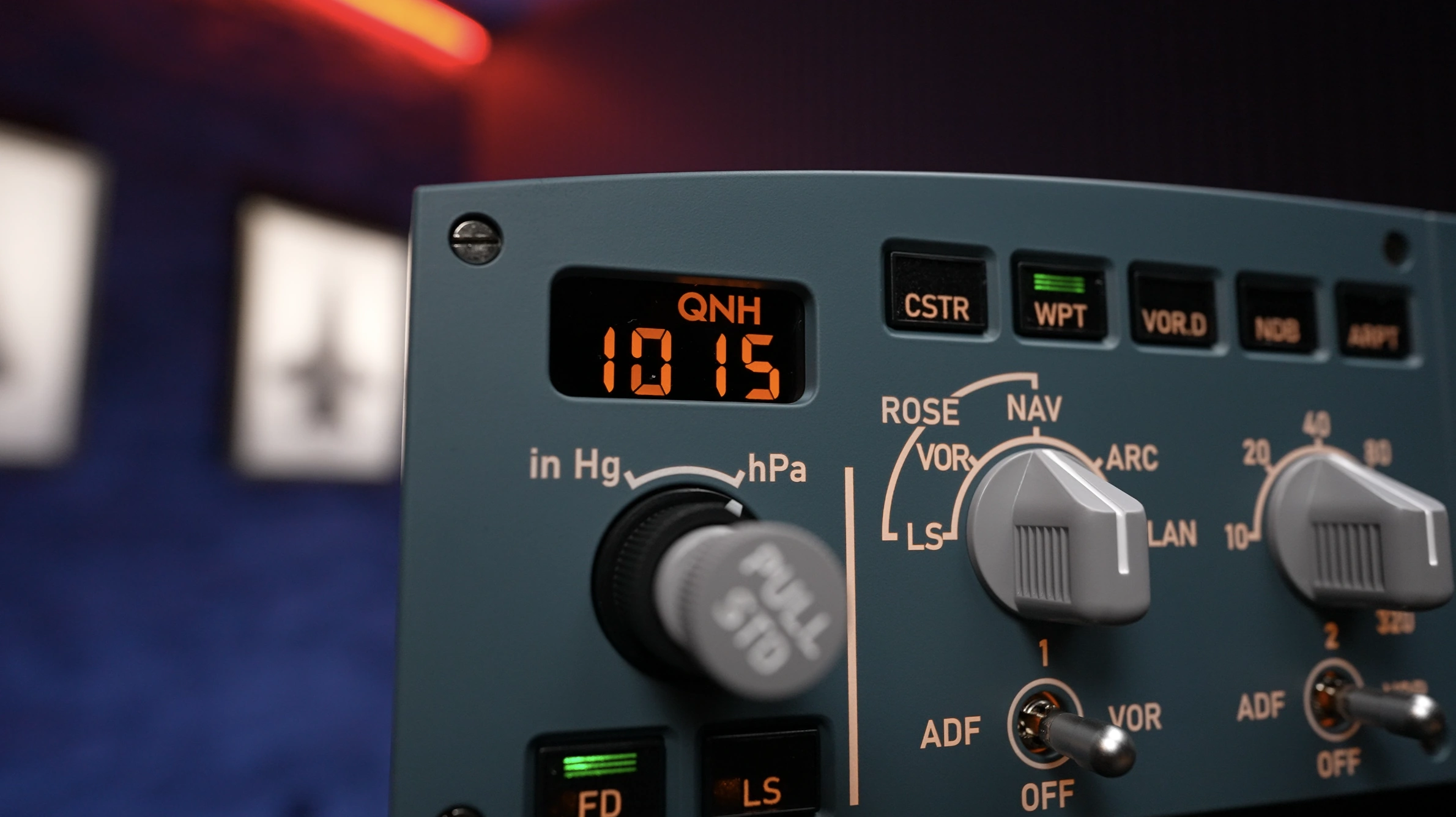
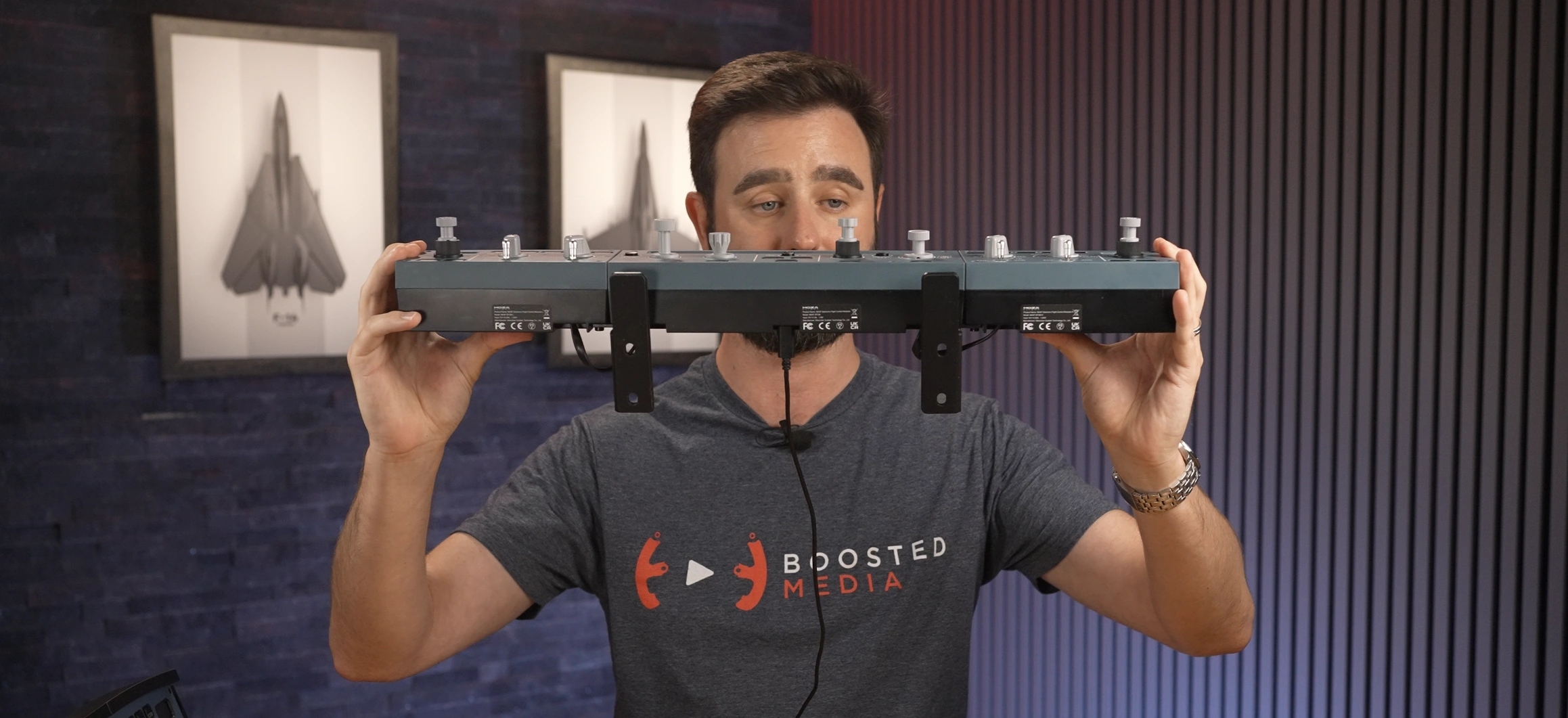
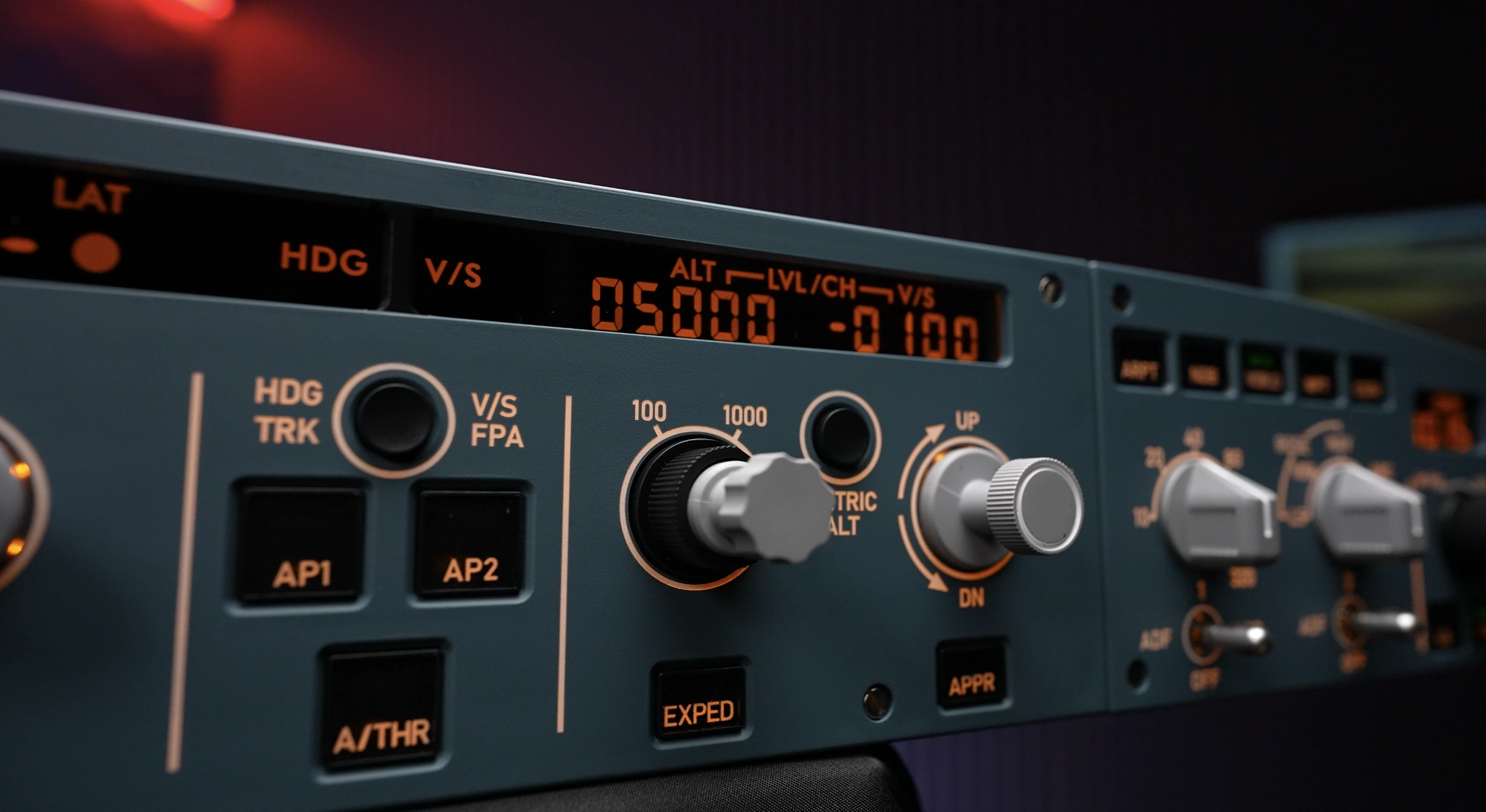
The front panel features laser-etched backlit legends together with custom LCD displays, while the rotary selectors use raised moulded lettering that makes each control easy to identify by feel as well as visually. Around the rear you’ll find USB Type‑C connectivity together with VESA-compatible mounting points for more permanent cockpit installations.
Desktop Stand
The supplied desktop stand is a noticeable improvement over some of MOZA’s earlier designs. It feels better thought out, offers a comfortable viewing angle and makes the panel quick to get up and running on a desk.
That said, physics still wins. Airbus flying involves a lot of pushing and pulling on the FCU selectors and, during normal use, the stand can still move around on the desk. If you’re planning to fly regularly, particularly on longer sectors, I’d still recommend looking at a more permanent mounting solution using the integrated VESA mounting pattern or a custom cockpit.
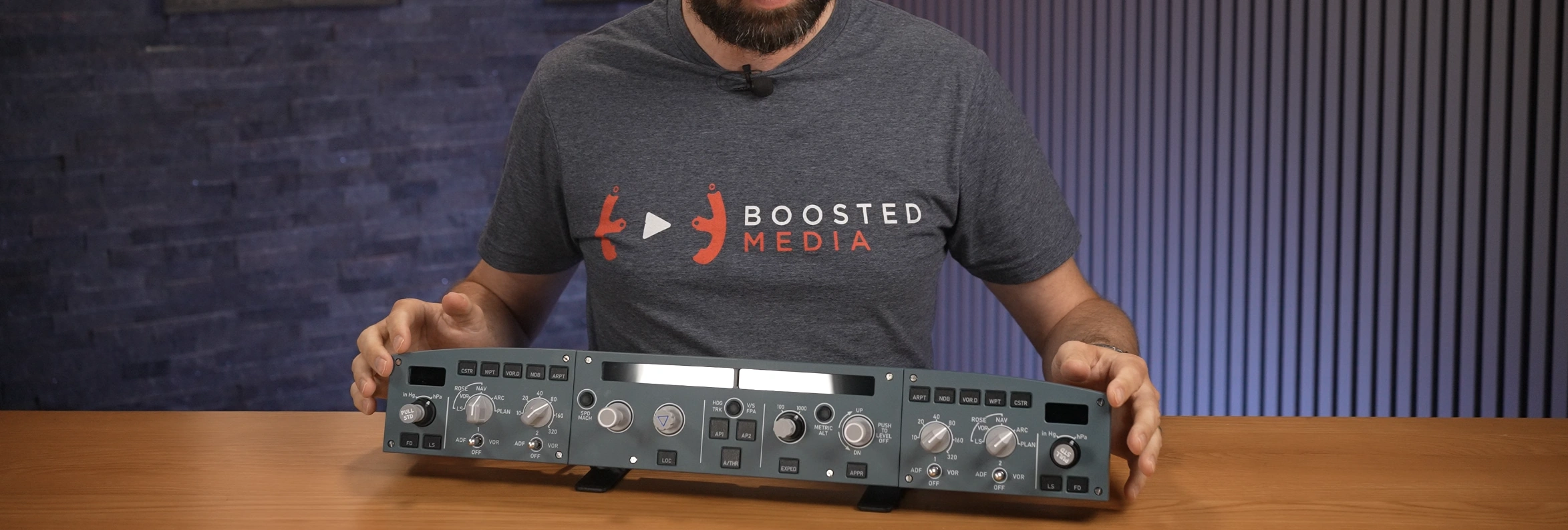
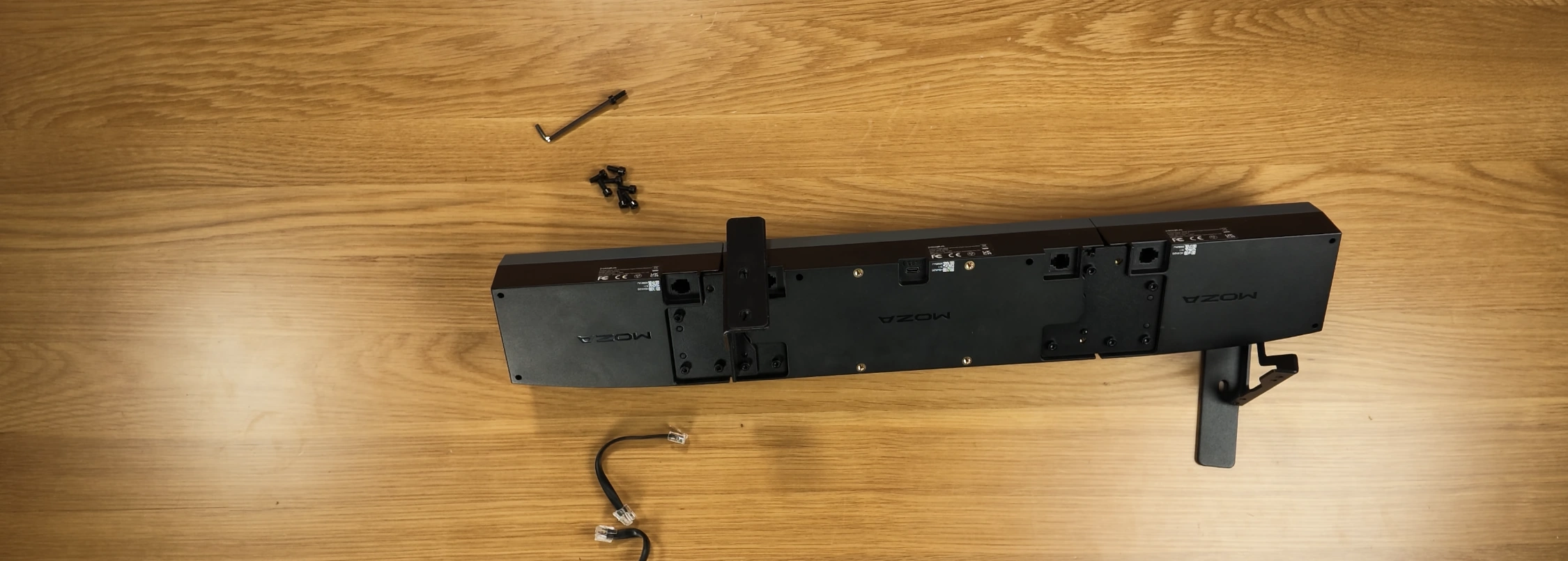
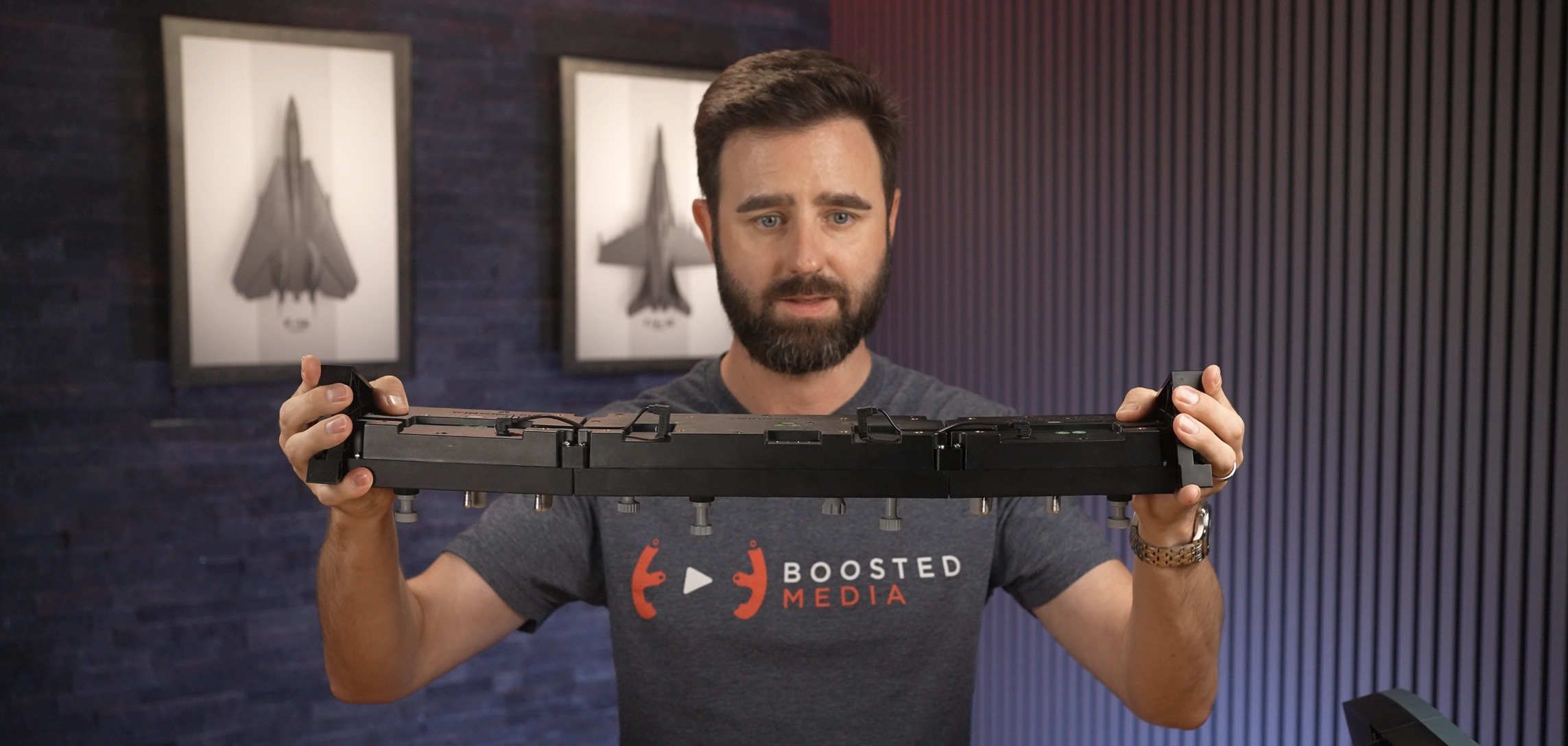
The plastic brackets used to join the FCU and EFIS panels together also work well enough, but they don’t provide the same level of rigidity I’d hoped for. With repeated push and pull inputs there’s a little movement across the complete assembly. It’s not enough to affect usability, but it’s something I’d like to see refined in a future revision.
Build Quality
The first thing that struck me wasn’t actually how the panel looked. It was how consistent everything felt.
One of the easiest ways to make simulator hardware feel cheap is having different buttons, encoders or switches all behave slightly differently. You might not consciously notice it during the first five minutes, but after a few hours it becomes surprisingly obvious. Fortunately, that isn’t the case here.
Every push button has a similar amount of travel and a consistent actuation force, while the rotary selectors all share the same level of resistance. Whether I was adjusting heading, altitude, speed or vertical speed, each encoder felt almost identical to the next.
The Airbus push and pull selectors deserve particular praise. They’re arguably the defining feature of any Airbus FCU, and after spending considerable time flying with both the MOZA and WINCTRL panels back-to-back, I actually found myself preferring MOZA’s implementation. The push and pull actions have a slightly more mechanical feel to them, making each selection feel deliberate without becoming heavy or cumbersome. Combined with the smooth rotary action, the overall experience simply feels a little more premium.
The EFIS panels continue that same level of consistency. Controls such as the VOR/ADF selector correctly require you to pull the switch before rotating it, just like the real Airbus. It’s a relatively small detail, but it’s exactly the kind of interaction that helps the panel feel more authentic during everyday use.
One issue I noticed throughout testing was light bleed around several of the black push buttons. During daytime flying it’s barely noticeable, but in a dark room the illumination escaping around the edges of the switch caps slightly detracts from what is otherwise a very premium-looking piece of hardware.
Finally, rigidity played a role in this review, WINCTRL use small plastic oval linkages to join the EFIS to the FCU and that design allows a lot of flex between the units which can detract from the use with the PUSH/PULL knobs found on the Left and Right EFIS.
Give the metal plates used in the MOZA design, this results in far superior strength with very little flex between the units.
Software
MOZA Cockpit continues to mature and over the few weeks I spent reviewing the MA3F I saw numerous firmware and software updates released. The review admittedly got off to a rocky start, but credit where it’s due, MOZA was incredibly proactive in addressing issues and the product improved noticeably throughout the review period.
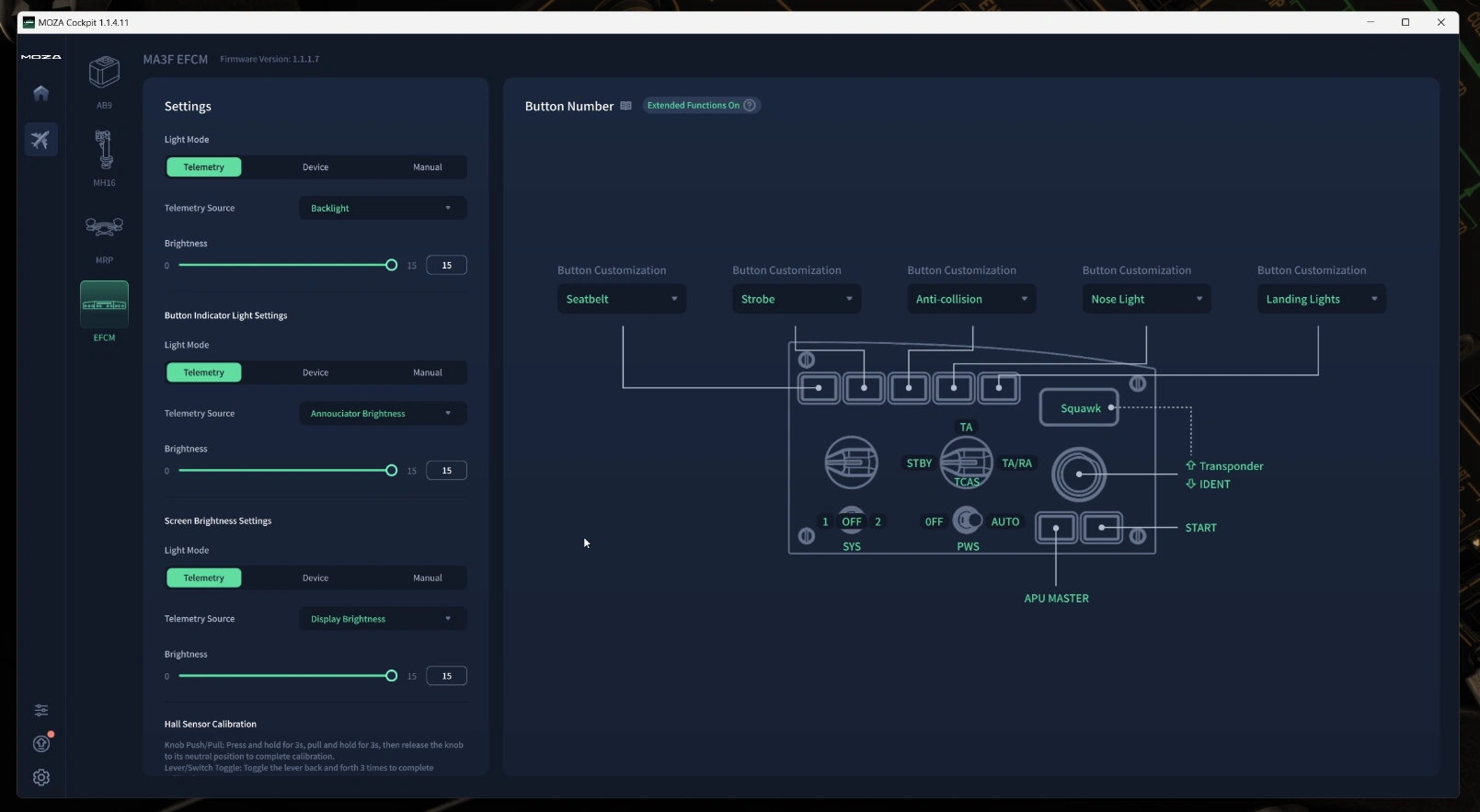
The standout addition is Extension Mode. By holding buttons such as CSTR or WPT you unlock a second layer of controls including the transponder, APU, TCAS, weather radar, seatbelt signs and many other functions. I’m a big fan of hidden functionality like this because it expands the capability of the hardware without requiring another panel on the desk.
Living With the MA3F EFCM
One of the biggest compliments I can give the MA3F is that after a few weeks I stopped thinking about it. That might sound strange, but good cockpit hardware should disappear into the background. Your attention should stay on flying the aircraft, not operating the controller sitting on your desk.
The optional EFIS panels ended up making a much bigger difference than I expected. Having dedicated controls for navigation display modes, range selection, barometric pressure and navigation aids meant I spent far less time reaching for the mouse, particularly during busy arrivals.
It’s those little interruptions that dedicated hardware removes. None of them are dramatic on their own, but together they make the entire Airbus workflow feel smoother and considerably more enjoyable.
Flying Experience
The MA3F quickly became one of those products that simply blended into my normal Airbus workflow. Every climb, cruise and descent involved regular interaction with the FCU, and having physical controls for those tasks made flying feel considerably more natural than relying on the mouse.
The biggest surprise wasn’t realism—it was convenience. After a few weeks I genuinely found myself missing the hardware whenever I returned to flying without it.
NEWSLETTER
Stay up to date with new releases And major updates
Thanks. Please check your email to confirm your subscription.
Sim RACING
Discount Codes
Also Sells
Ascher Racing, Gomez Sim IndustriesAlso Sells
Ascher Racing, Base Performance Simulators, BDH Race Sim Hardware, ButtKicker, Cube Controls, D-BOX, Delta Sim-Tech, Gomez Sim Industries, Heusinkveld, ignitiON Controls, Max Papis Innovations, MME Motorsport, Moza, P1Sim, PlaySeat, Precision Sim Engineering, Qubic System, Simucube, Sparco, Thrustmaster, VNM Simulation, VPG SimAlso Sells
Alien Mods, Asetek, ButtKicker, CAMMUS, Conspit, Cube Controls, D-BOX, Heusinkveld, LeoXZ, Moza, Racebox, Simagic, Simnet, Unreal Racing, VNM SimulationAlso Sells
3DRAP, ANOTHER WAY, Ascher Racing, Asetek, BavarianSimTec, BDH Race Sim Hardware, ButtKicker, Conspit, Cooler Master, Cube Controls, D-BOX, Dayton Audio, Delta Sim-Tech, DOF Reality, Elgato, ESPORTSIM SRL, Fanatec, Gomez Sim Industries, Heusinkveld, HORI, KGL Creation Lab, LeoXZ, MME Motorsport, Moza, Next Level Racing, Nitro Concepts, NOVUS, O-ROUGE, P1Sim, Pimax, PlaySeat, Prosimu, PXN, Qubic System, Raslution, ResTech, Rexing, Sabelt Sim Racing, SG Racing, SIM FACTORY, Sim Racing Studio, Sim-Lab, Simagic, SIMFORGE, SIMGRADE, SimRep Engineering, SIMTRECS, Simucube, Simufy, SIMXPRO, SOELPEC, Sparco, Thrustmaster, VIRPIL, VNM Simulation, VPG Sim, VRSAlso Sells
BavarianSimTec, MME Motorsport, Qubic System, Sabelt Sim RacingAlso Sells
Ascher Racing, Asetek, BDH Race Sim Hardware, ButtKicker, Conspit, D-BOX, Dayton Audio, Fanatec, Heusinkveld, Moza, Nitro Concepts, Pimax, PlaySeat, Qubic System, Rexing, Sabelt Sim Racing, Sim-Lab, Simagic, Simucube, VNM Simulation, VPGAlso Sells
Cobra, PRO SIMRIG, Qubic System, Simagic, SparcoAlso Sells
Asetek, BJR, ButtKicker, Cube Controls, Fanatec, Moza, Next Level Racing, Thrustmaster, Turtle BeachAlso Sells
Asetek, Conspit, Cube ControlsAlso Sells
BavarianSimTec, Conspit, Cooler Master, Cube Controls, DOF Reality, Moza, Pimax, Qubic System, Racebox, ResTech, Sigma Integrale Motion Systems, SimucubeAlso Sells
Conspit, Cube Controls, D-BOX, Elgato, Moza, Pimax, PlaySeat, Sigma Integrale Motion Systems, Simagic, SimucubeConclusion: 8/10
The MA3F left me genuinely impressed. The hardware feels refined, the controls are satisfying to use and the software continues to improve at an impressive pace.
If I was building an Airbus cockpit from scratch today, the MA3F would sit very high on my shortlist. The more realistic push and pull actions, smoother rotary knobs and genuinely useful Extension Mode all help separate it from the competition.
If you already own the WINCTRL panel, however, I don’t think this is an automatic upgrade. WINCTRL remains an excellent product and unless you’re already invested in the MOZA ecosystem or particularly value the refinements MOZA has introduced, I’d be happy continuing to fly with either.
For new buyers though, MOZA has produced a genuinely competitive Airbus FCU that pairs beautifully with the MA3F Flight Computer Display. Assuming the company continues refining the software at the pace demonstrated throughout this review, I think the MA3F EFCM has every chance of becoming one of the strongest Airbus autopilot panels currently available in this price range.
Related Articles

MOZA FMP18 Panel Bundle Review
Dual DDIs, a centre AMPCD and the Hornet’s up-front controls on your desk. We test MOZA’s FMP18 Panel Bundle in DCS and compare it against the WINCTRL TOP GUN MIP 2.

MOZA MGX1000 Review
The G1000 is one of the most recognisable glass-cockpit systems in general aviation, and for many flight simmers it is also one of the most

MOZA MA3F Flight Computer Display Review 2026
A Premium Airbus MCDU That Keeps Getting Better The MCDU is arguably the heart of any Airbus cockpit. Before the engines are even started it’s
Thrustmaster HOTAS Warthog Review (2026): Revisiting a Flight Sim Legend
Few flight simulation products have achieved the legendary status of the Thrustmaster HOTAS Warthog. Released in 2010, it arrived at a time when most simmers
MOZA AB6 vs AB9 – FLIGHT Force Feedback Base Review
If your desk is held together with hope, hot glue, and a dream — this might be a difficult read. On one side we have
Trak Racer Flight Simulator Seat Review
A Good Budget Flight Sim Seat? If you’re building a flight simulator cockpit, one of the most overlooked parts of the setup is the seat.
MORE REVIEWS and Discounts


If these Sim Racing Reviews have helped you find the best racing simulator gear for your sim rig, please consider using the affiliate links on this website. By purchasing through these links, a small commission will come back to Boosted Media at no additional cost to you. This is how Boosted Media keeps providing content to the Sim Racing community.
About The Author
-

Sean is a pilot with over two decades of experience in aviation and senior technology roles within Airlines and Non-Profit sectors. He's a lifelong flight simmer and avid VR user, blending his passion for flying with cutting-edge technology. From cockpit to virtual skies, Sean loves all things Tech and Aviation.